Bald Filter: Preview Yourself With a Shaved Head
Written by Style Look Lab Editorial Team · Updated September 2026 · 5 min read
Explore a shaved-head appearance, then compare it with a separately generated buzz-cut reference if you want to see the visible difference. Focus on the hair-free outline around the forehead and face.
Pick a style and add your photo first; sign in when you generate · 2 starter credits · 1 credit per standard preview.
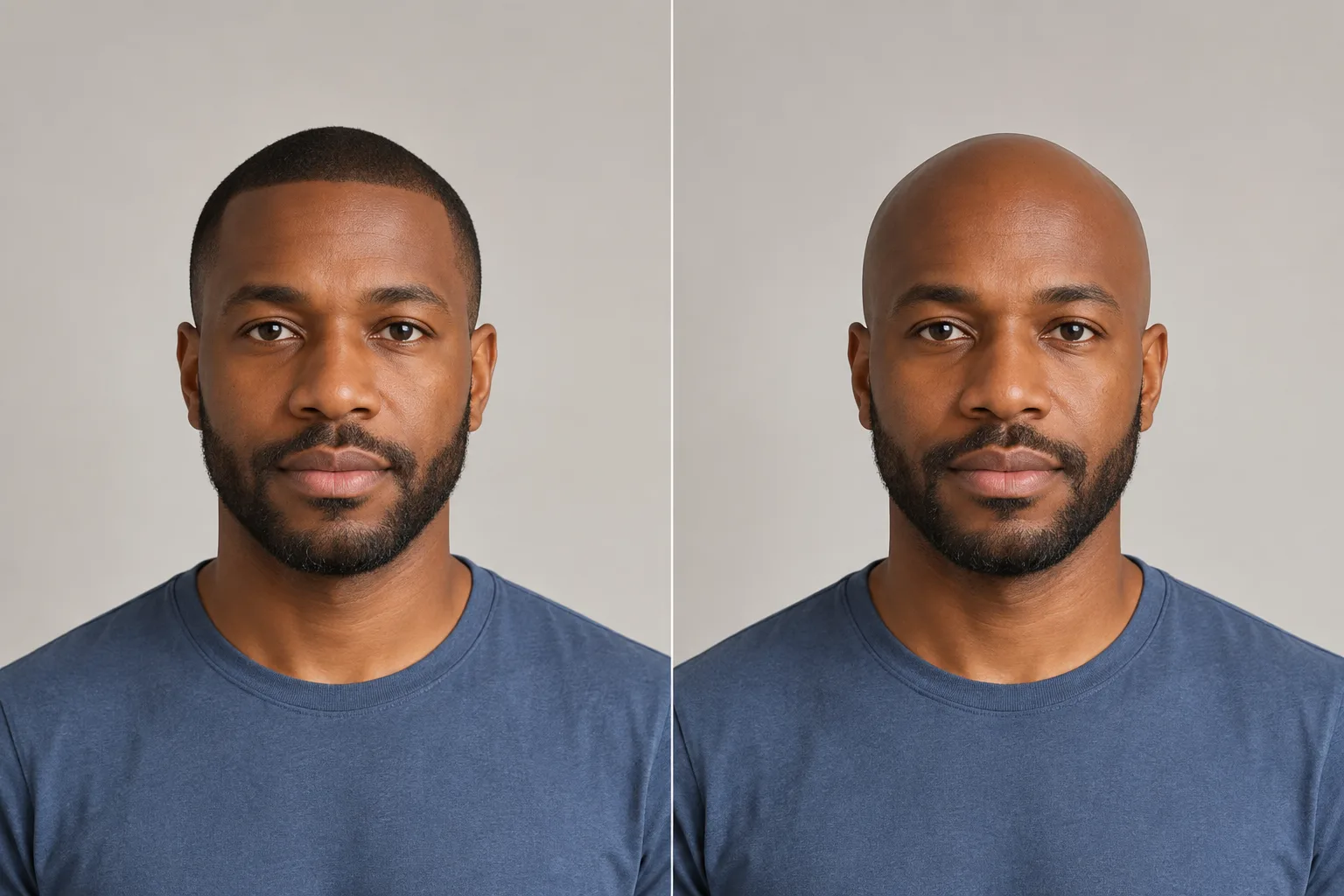
What remains hidden beneath the hair
A bald preview illustrates a changed outline. It cannot reveal the real scalp or head shape beneath the hair.
What it shows well
- An approximate hair-free appearance around your face.
- The contrast between a selected shaved-head style and your original photo.
- A reference image to compare with a separate buzz-cut preview.
What it can't predict
- The true contours of your skull — dents, flat spots, scars, or birthmarks hidden under hair.
- The color difference between freshly exposed scalp and your weathered face right after shaving.
- Real scalp texture — pores, marks, and how your skin actually behaves without cover.
- The exact shape of the back of your head, which a front-facing photo can't capture.
- How a bald scalp catches and reflects light in real-world sun or harsh overhead lighting.
- The feel of the change — smooth-shaved versus sandpaper stubble is a hand test, not a visual one.
Treat the preview as a visual reference; the final call is yours, weighed against the upkeep you are willing to put in.
Compare a shaved head with nearby short styles

Fully Shaved
The hair-free reference on this page. Compare the exposed outline with your original photo.

Buzz Cut
A neighboring short-hair comparison with a visible layer left on the head.

High and Tight
A short style with contrast between top and sides. Compare it separately from a shaved-head appearance.

Close Cropped
A very close cropped reference that can still leave visible hair. Compare that layer with the hair-free outline.
Compare the hairstyle references, then try them on your own photo. Generated results can vary with lighting, angle, and face visibility.
Separate a hair-free outline from a close crop
| Style | What to compare | Look for | What a photo can't settle |
|---|---|---|---|
| Shaved-head appearance | Comparing a hair-free visual outline | Look at exposed forehead and head edge | The original hair can conceal head details |
| Buzz cut | Comparing a visible short-hair layer | Look for texture and shadow | A short crop is not a bald style |
| High and tight | Comparing short top with side contrast | Look at the top-to-side change | A short crop is not a bald style |
| Induction cut | Comparing a closer cropped hair layer | Look for remaining hair at the edge | A short crop is not a bald style |
Compare the hair-free outline with care
This page is for comparing a hair-free appearance around the forehead, face, and head outline. Look for three things: whether a short-hair shadow remains, how exposed the forehead appears, and whether the overall frame feels right to you. A shaved-head reference is distinct from short cuts such as buzz, induction, or high and tight; those are neighboring comparisons, not bald variants.
The table is a set of visual prompts, not a head-shape assessment or a recommendation to shave. A front-facing photo cannot show the back of the head, the scalp under existing hair, scars, or skin texture. Compare the outline you see and decide whether you prefer it to a visible short-hair layer.
| Face shape | Compare first | Why |
|---|---|---|
| Round | Shaved head and buzz cut | Compare a hair-free outline with a visible short-hair layer.Careful with: Using either result as a verdict about your face. |
| Long / oblong | Shaved head and high and tight | Compare the exposed forehead with a short top and side contrast.Careful with: Inferring head shape from a front-facing image. |
| Square | Shaved head and induction cut | Compare a hair-free edge with a close cropped layer.Careful with: Treating generated scalp details as physical facts. |
| Heart | Shaved head and buzz cut | Compare how much of the forehead and head outline is exposed.Careful with: Turning the comparison into a hair-loss assessment. |
| Oval | Two clearly different references | The comparison can stay on the outline you personally prefer.Careful with: Skipping real-world shaving and care considerations. |
Preview a shaved-head appearance
- 1
Upload a photo
Upload a clear, front-facing photo with the full head visible. You sign in or create an account when you generate.
- 2
Choose the shaved-head style
Select Shaved Head from the hairstyle library. To compare an alternative, generate a separate buzz-cut preview.
- 3
Generate, download, and compare
Generate the selected look and download the preview. Keep the original photo the same when trying another style so the comparison is easier to read.
Frame the head outline clearly
Keep the full head and hairline visible in a clear, evenly lit photo so the hair-free outline is easier to compare.
- Face the camera straight on — a front view lets the tool map your head outline correctly.
- Show your complete hairline and the top contour of your head; don't crop above the brow.
- Skip hats, hoods, and headbands — anything covering the scalp forces the tool to guess.
- Use natural, even lighting; harsh side shadows distort how a bare scalp renders.
- Pull or brush your hair back off your forehead so your hairline isn't hidden.
- Turn off beauty filters and skin smoothing — they alter the exact features the preview depends on.
See it on your own face
Choose a hairstyle and add a clear photo, then sign in when you generate. This page does not preselect a style. Processing time and results vary.
Try a hairstyle on your photoShaved-head preview questions
Is the bald preview generated on my actual face?
The tool generates a preview from your uploaded photo and selected style. Facial details, hair color, or other parts of the image can change during generation, so compare the result with the original before using it as a haircut reference.
What happens to my photo? Is it stored or used for training?
Photos are sent to third-party providers for generation and may be stored with your account. Read the Privacy Policy for current processing, retention, and deletion details before uploading. Read the Privacy Policy
What kind of photo gives the most accurate bald preview?
A sharp, front-facing photo in natural, even light, with your hair pushed back so your full hairline and the top of your head are visible. Skip hats and beauty filters — the tool builds the bald render from your real head outline, so the less it has to guess, the better the result.
What should I look for in a bald preview?
Compare the exposed forehead, the head outline around the face, and whether a short-hair shadow remains. Generate a separate buzz-cut reference if you also want to compare a visible hair layer.
Can this tell me whether I should shave because of hair loss?
No. The tool can give you an appearance to react to, but it does not assess hair loss or scalp conditions. A barber or qualified professional can help with a real-world decision.
Is the bald filter free? Do I need to sign up?
An account is required to generate a preview. New accounts receive 2 starter credits. A standard hairstyle transformation uses 1 credit. Check the pricing page for other action costs and additional credits. View pricing and credits
Can I show the result to my barber?
Yes. Download the preview and bring the original photo too. Explain which details you like, such as length or the outline at the sides. Your stylist or barber can assess what is achievable with your actual hair texture, density, and growth pattern.
Use the shaved-head image to react to an outline, then compare a buzz separately if you are deciding between no visible hair and a short layer.
Try it on your photoExplore more: AI Hairstyle Changer
Buzz cut vs. bald: compare the looks
Compare the presence of short hair with a hair-free appearance before choosing your next step.