AI hair color changer · 23 shades
Try a new hair color, keep your cut.
Add one photo and see your own hair in up to 4 colors at once, from ash blonde to burgundy. The AI hair color changer recolors only your hair: your face, haircut, length and background stay exactly as they are.
- 23 shades in 6 groups
- 4 colors per round, side by side
- 2 free credits with Google sign-in
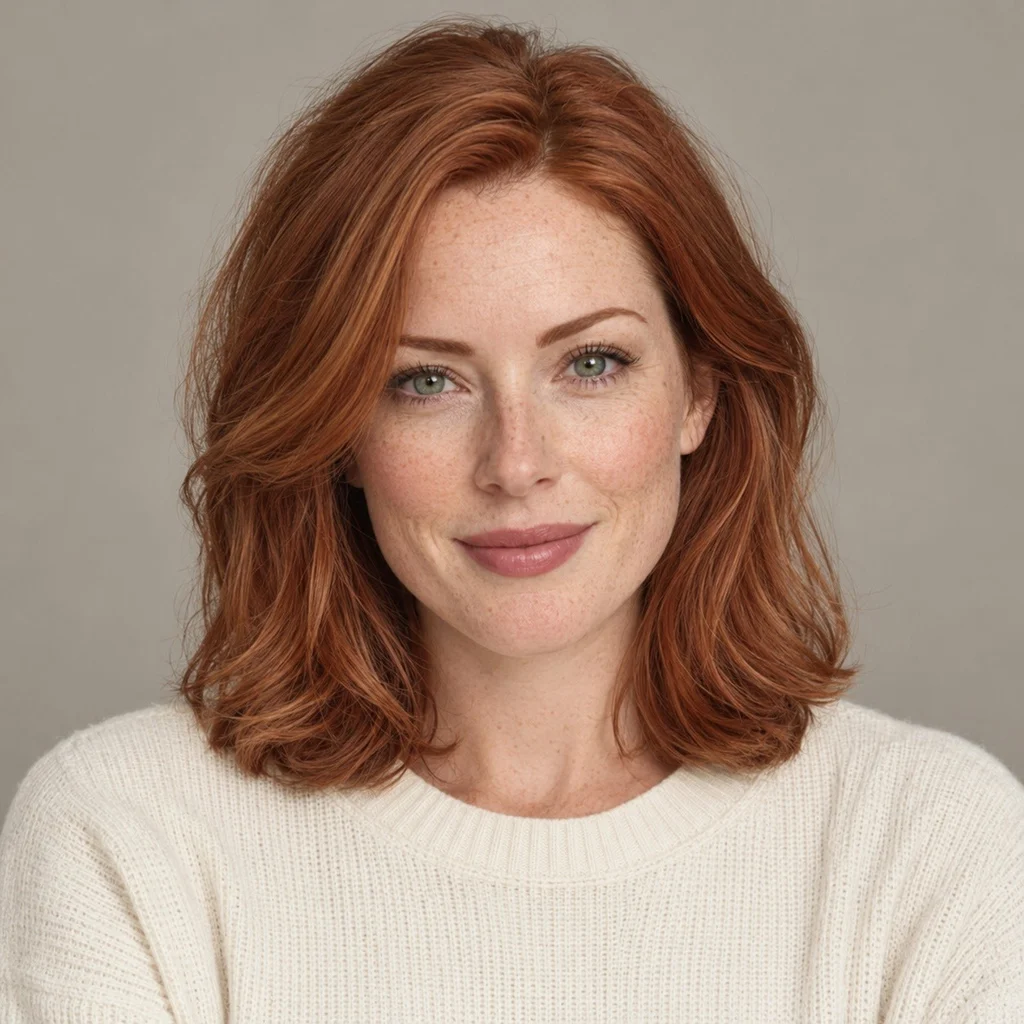
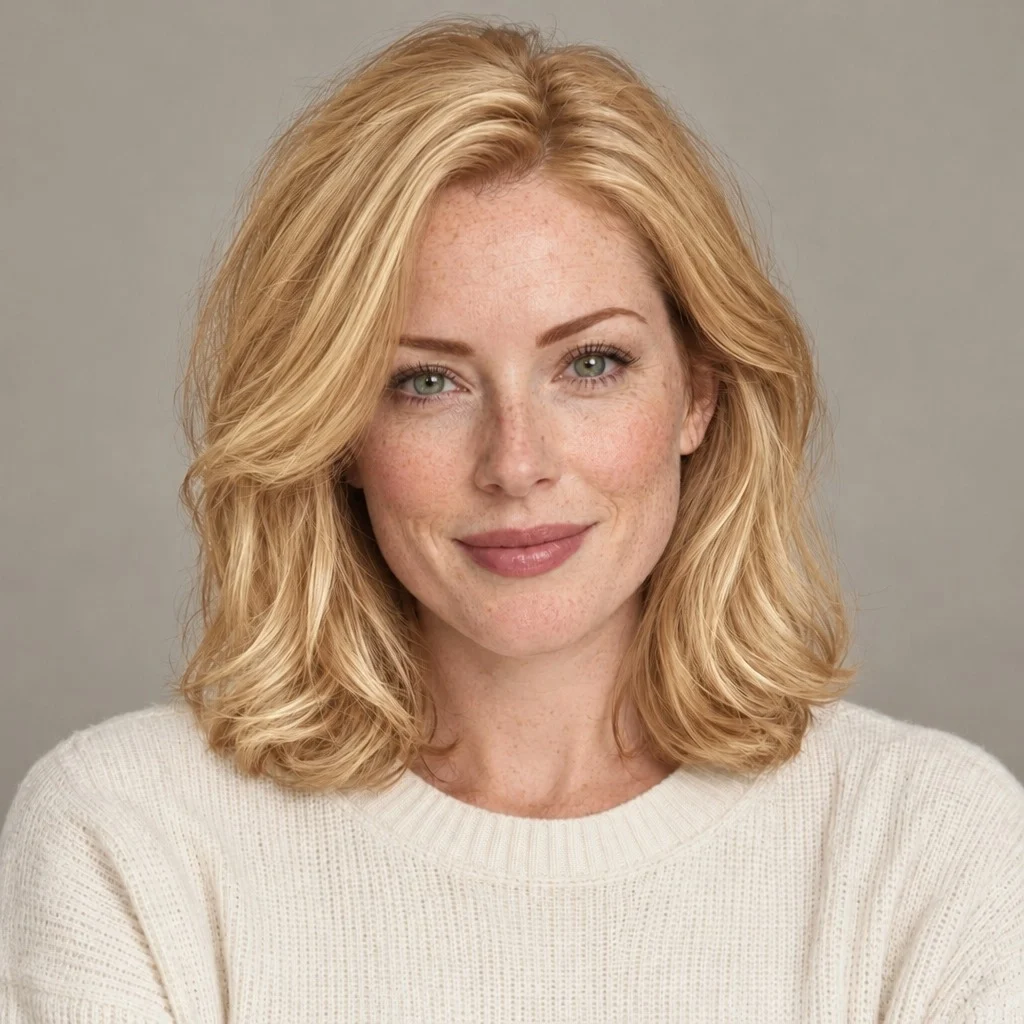 Original · CopperGolden Blonde
Real results from this tool in “Keep my hairstyle” mode. One photo, no retouching.
One photo, seven shades.
The same face, the same light and the same cut. Only the hair color changes, and that is exactly what makes the comparison useful: when everything else stays still, you can see what a shade does to your skin, your eyes and the overall contrast.
- OriginalCopper
- Golden Blonde
 Ash Blonde
 Chocolate Brown
 Jet Black
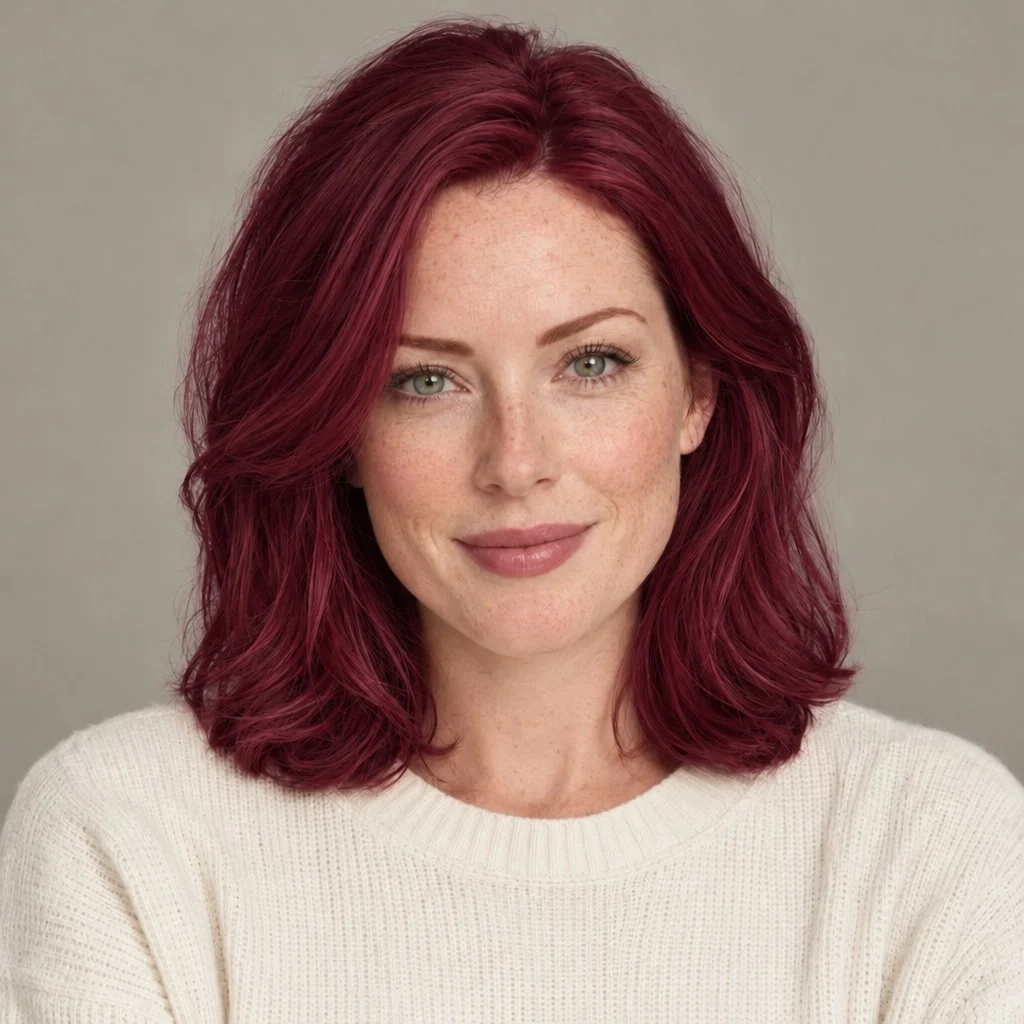 Burgundy
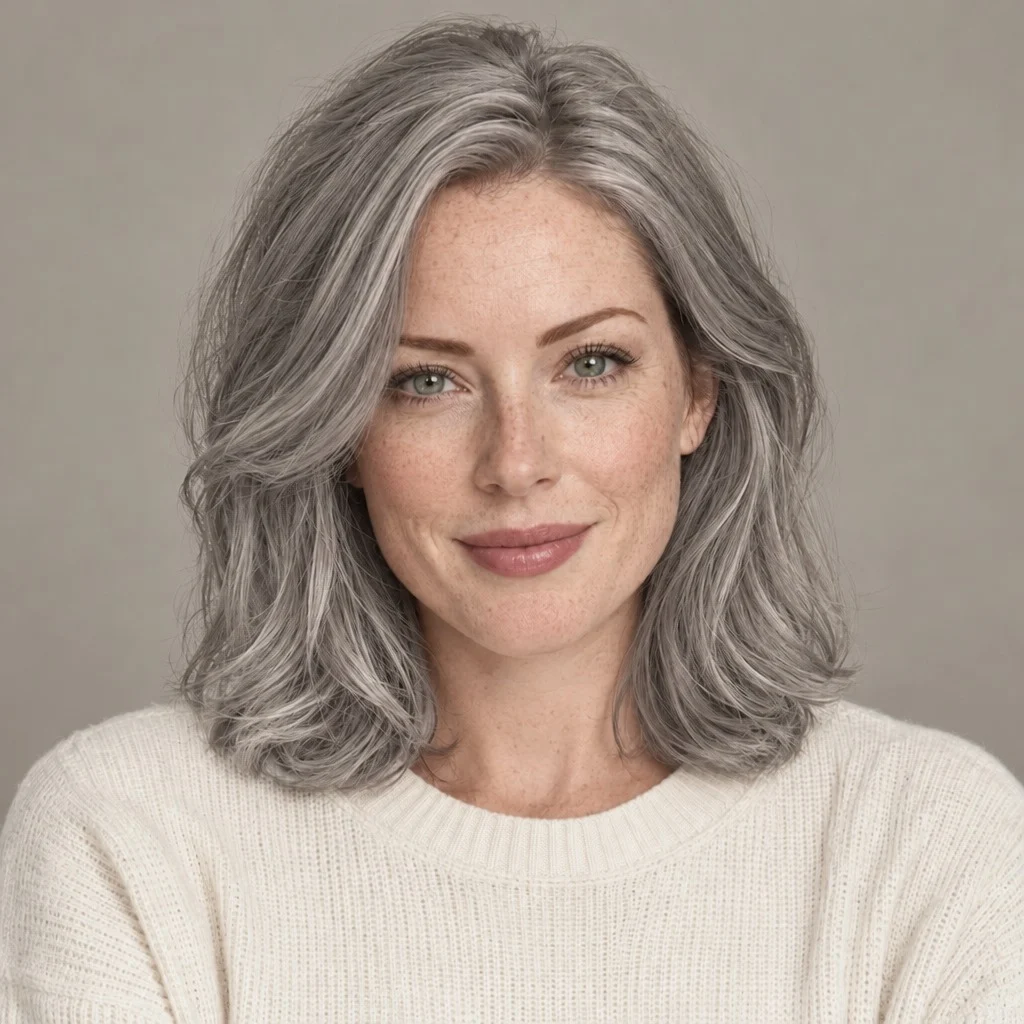 Silver Gray
The original photo has copper hair. Every other tile was generated from that single photo.
How to change your hair color in a photo
Changing your hair color in a photo takes three steps and about a minute. There is no app to install, and you can pick colors before you sign in.
- 01
Add one clear photo
Use a front-facing photo in daylight with your hairline and the length of your hair visible. JPG, PNG, WebP and HEIC files up to 10 MB work, straight from your phone’s camera roll. The photo stays in your browser until you press Generate.
- 02
Pick up to 4 shades
“Keep my hairstyle” is already selected, so only the color will change. Choose from six groups of shades, or load the four shades suggested for your color season from the table further down this page.
- 03
Compare and decide
Each shade appears next to your original photo and uses 1 credit. Compare two at a time, keep the ones you like, and download a preview to show your colorist.
23 hair colors to try on
The hair color changer includes 23 shades in six groups. Tap any shade to open the tool with that color already selected. Each note is a starting point, not a rule.
Blonde6 shades
From icy platinum to strawberry. Blondes change a photo the most, so they are worth previewing first, especially if your natural color is dark.
- Platinum BlondeCool and very light. Strong contrast on deep coloring.
- Ash BlondeCool and smoky. A favorite for Summer coloring.
- Beige BlondeNeutral. Softens your color without adding gold.
- Honey BlondeWarm and golden. Easy on Spring and Autumn coloring.
- Golden BlondeBright and warm. Best with warm undertones.
- Strawberry BlondeWarm red-gold. Classic Light Spring territory.
Brown6 shades
The easiest everyday changes. Use them to test whether you want more warmth, more depth or a cooler, smokier finish.
- Caramel BrownA warm mid-brown with golden light.
- Golden BrownWarm and rich. Keeps depth and adds glow.
- ChestnutWarm-neutral. Flattering on most Autumn coloring.
- Chocolate BrownDeep and neutral. A safe step darker.
- Ash BrownCool and muted. Calms warm or red tones.
- Dark BrownDeep and close to black. Low maintenance.
Black2 shades
Jet black is neutral; blue black adds a cool sheen. Both give your face the most contrast.
Red4 shades
Copper and auburn are warm; burgundy and cherry lean cooler. Reds fade fastest in real life, so a preview helps you decide whether the upkeep is worth it.
Gray2 shades
Preview silver or salt and pepper before you stop dyeing or start blending gray.
Fashion3 shades
Pastel pink, lavender and electric blue. In real life they need very light, bleached hair; in a preview they take one click.
What hair color looks best on me?
No chart can answer that on its own, but three checks narrow the list to a few shades. Then put the short list on your own photo, because your face shows more than any rule.
Undertone
- Cool
- Neutral
- Warm
Look at the inside of your wrist in daylight and compare silver jewelry with gold. Cool undertones usually look clearest in ash blonde, beige blonde, ash brown, blue black and burgundy. Warm undertones usually glow in golden blonde, honey, caramel, copper and auburn. Neutral undertones can wear most shades, so contrast often decides.
Take the skin tone testContrast
- High
- Medium
- Low
Compare the depth of your hair, skin and eyes. High natural contrast, such as dark hair with fair skin, carries jet black, platinum and vivid reds. Low contrast usually looks more natural in shades a step softer, such as beige blonde, chestnut or a quieter copper.
What season am I?Distance
- Your shade
- +1
- +2
Colorists often suggest staying within about two shades of your natural color for a first change, because it suits your eyebrows and skin and grows out gracefully. Bigger jumps, such as dark brown to blonde, are exactly the ones worth previewing first.
Get a color analysis
Hair color for cool, warm and olive skin
Cool skin
Ash blonde, beige blonde, platinum, ash brown, blue black and burgundy.
Warm skin
Golden blonde, honey, strawberry blonde, caramel, copper and auburn.
Olive skin
Chocolate brown, chestnut, dark brown and burgundy usually look balanced, while very ashy blondes can look gray against a green undertone.
Preview two shades from your list and one from outside it. The contrast between them tells you more than the rule does.
Hair colors for your color season
If you already know your color season, start here. Each row shows the closest shades in the AI hair color changer to the hair colors our season guides suggest. “Try these” opens the tool with all four selected.
Spring
- Light Spring
- Golden Blonde
- Honey Blonde
- Strawberry Blonde
- Copper
- Warm Spring
- Honey Blonde
- Golden Blonde
- Strawberry Blonde
- Golden Brown
- Clear Spring
- Golden Brown
- Chocolate Brown
- Copper
- Golden Blonde
Summer
- Light Summer
- Ash Blonde
- Beige Blonde
- Ash Brown
- Silver Gray
- True Summer
- Ash Brown
- Beige Blonde
- Ash Blonde
- Salt & Pepper
- Soft Summer
- Ash Brown
- Beige Blonde
- Silver Gray
- Ash Blonde
Autumn
- Soft Autumn
- Honey Blonde
- Chestnut
- Caramel Brown
- Copper
- True Autumn
- Auburn
- Copper
- Chestnut
- Golden Blonde
- Deep Autumn
- Chocolate Brown
- Dark Brown
- Chestnut
- Copper
Winter
- Deep Winter
- Blue Black
- Jet Black
- Dark Brown
- Burgundy
- Cool Winter
- Blue Black
- Dark Brown
- Ash Brown
- Salt & Pepper
- Clear Winter
- Blue Black
- Jet Black
- Dark Brown
- Platinum Blonde
Shades are the nearest matches in the tool, not dye formulas. Highlights, balayage and gray blending from the season guides are previewed as the closest single shade.
Don’t know your season? The free what season am I quiz takes about two minutes, and an AI color analysis reads it from your photos.
How accurate is an AI hair color changer?
A virtual hair color try-on is very good at one job: showing the direction of a change on your own face. It is not a dye formula. Use the preview to decide what to ask for, then let a colorist decide how to get there.
It can show
- Whether a shade looks warm or cool against your skin
- How much lighter or darker you want to go
- Which of two to four options you prefer, side by side
- A clear reference picture to show your colorist
It can’t predict
- The exact dye or salon result
- How bleach will react with dark or previously dyed hair
- Fading, upkeep and root growth
- Highlights, balayage or ombré placement
Dark hair and big changes
Going from dark brown or black to blonde, pastel or silver usually needs bleach, and often more than one appointment. The preview shows the end point, not the steps. If the end point looks right, take the picture to a colorist and ask how many sessions it would take from your current color.
Getting a realistic preview
Use daylight rather than warm indoor bulbs, turn off beauty filters, and keep the same photo for every shade. Changing the photo between shades also changes the light and the camera, which makes a fair comparison impossible.
AI hair color changer vs brand try-on tools
Hair dye brands offer virtual try-ons too. They are built to show one product line, usually one shade at a time. This tool is built to help you choose a direction first, across any brand, and to compare several shades on one photo.
| Feature | Style Look Lab | Dye brand try-ons | Photo editor apps |
|---|---|---|---|
| Works on | Your own photo | Live camera or photo | Your own photo |
| Keeps your haircut | Yes, by default | Yes | Varies by app |
| Shades | 23, not tied to a brand | That brand’s products | Varies by app |
| Picks for your color season | Yes, all 12 seasons | No | No |
| Try a new cut too | 154 hairstyles | No | Some apps |
| Compare side by side | Up to 4 at once | One at a time | One at a time |
If you already know which brand you will buy, its try-on is useful for checking exact shade names. If you are still choosing between blonde and brown, or warm and cool, compare the direction here first.
Questions about the AI hair color changer
How does the AI hair color changer work?
Add one clear, front-facing photo and pick up to 4 shades. The AI finds your hair, recolors it, and keeps your face, cut, length and background as they are. Each shade appears next to your original so you can compare them side by side.
Can AI change my hair color and keep my hairstyle?
Yes. “Keep my hairstyle” is the default on this page, so only the color changes. If you also want to see a new cut, choose any of the 154 hairstyles in Hairstyle AI and add a color to it.
Is the hair color changer free?
You can pick colors and add a photo without an account. Generating needs a free Google sign-in; new accounts get 2 free credits, and each shade uses 1 credit. More credits are available on the pricing page, with no subscription.
What hair colors can I try?
23 shades in six groups: 6 blondes, 6 browns, 2 blacks, 4 reds, 2 grays and 3 fashion colors (pastel pink, lavender and electric blue).
How do I change my hair color in a photo online?
Open the tool, add one photo, choose up to 4 shades and press Generate. You don’t need an app or editing skills, and it works on phones, tablets and computers.
Is a virtual hair color try-on accurate?
It is reliable for direction: warm or cool, lighter or darker, soft or bold. It cannot predict the exact salon result, which depends on your starting color, any previous dye or bleach, and the products your colorist uses.
What hair color looks best on me?
Start with undertone and contrast. Cool undertones tend to suit ash, beige, blue black and burgundy; warm undertones tend to suit golden, honey, copper and caramel. Shortlist three shades and compare them on your own photo.
What would I look like with blonde hair?
Try two or three blondes side by side: cool undertones usually suit ash or platinum, warm undertones usually suit honey or golden. Going from dark hair to blonde in real life normally needs bleach.
Can I try gray or silver hair before I stop dyeing?
Yes. Silver gray and salt and pepper are both in the set, so you can see a fully gray result before you start growing it out or blending it.
Will it work on very dark or dyed hair?
Yes, the preview works from any starting color. Lightening dark or previously dyed hair in real life usually takes bleach and more than one appointment.
Can I try the hair colors for my color season?
Yes. Use the season table on this page: “Try these” opens the tool with that season’s four suggested shades already selected.
What happens to my photo?
Your photo stays in your browser until you press Generate. After that, the photo and results are saved to your account so you can come back to them, and you can delete them at any time.