To try on hairstyles with your own photo, open the AI hairstyle changer, add one clear front-facing photo, choose up to 4 hairstyles from the women’s or men’s library, and press Generate. Each finished look appears on your photo, so you can compare the options side by side and save the ones worth showing your stylist. It runs in your browser; there is no app to install.
The tool shows the styles you pick; it doesn’t decide which one suits you, and each result is a visual approximation, not a promise of how a real cut will turn out.
Which photo gives you a clean baseline?
Use a sharp, mostly front-facing photo in even light, with your whole face, hairline, and hair outline in the frame. Leave a little space above and beside your head, take off hats and sunglasses, and skip beauty filters. The tool accepts JPG, PNG, and WebP files up to 10 MB.
A plain background makes the hair edge easier to see. You don’t need a professional portrait, just a clear reference point.
Use the same photo for every look you want to compare. Different selfies bring different angles, expressions, and lighting, and those differences can outweigh the haircut itself.
How do you try on hairstyles step by step?
Add your photo, choose your hairstyles, then generate. The first two steps can be done in either order, and nothing is generated until you press the button.
1. Add your photo
On the hairstyle changer page, select the card marked 01 · Your photo (“Add your photo”) and pick a file, or drag the photo onto the card. When it’s in, the card shows Photo added and the photo fills the large frame beside it. Change photo swaps it without clearing the hairstyles you have already chosen.
Your photo stays in your browser until you generate. Before uploading, you can review the site’s photo and privacy information.
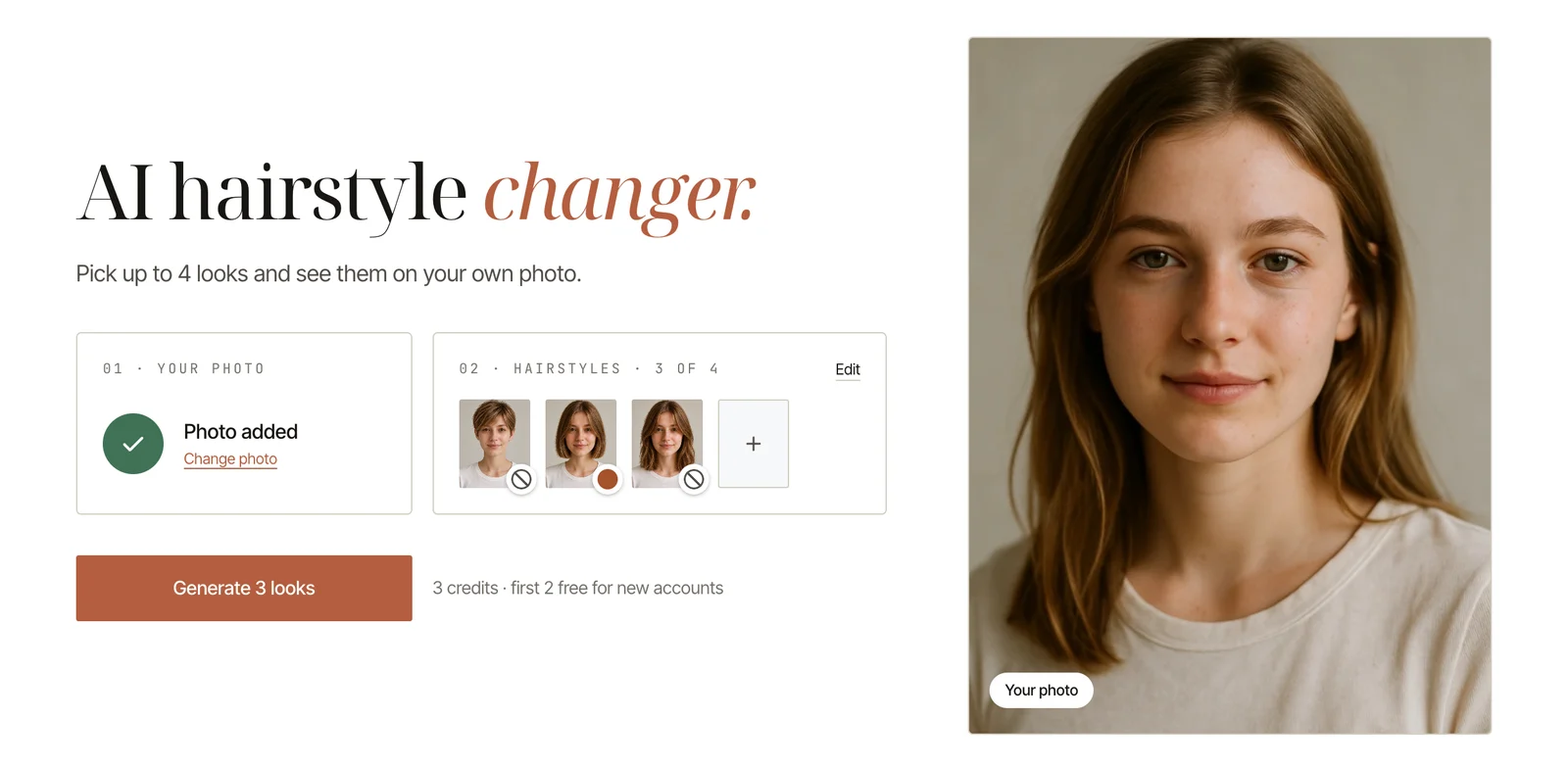
2. Choose up to 4 hairstyles
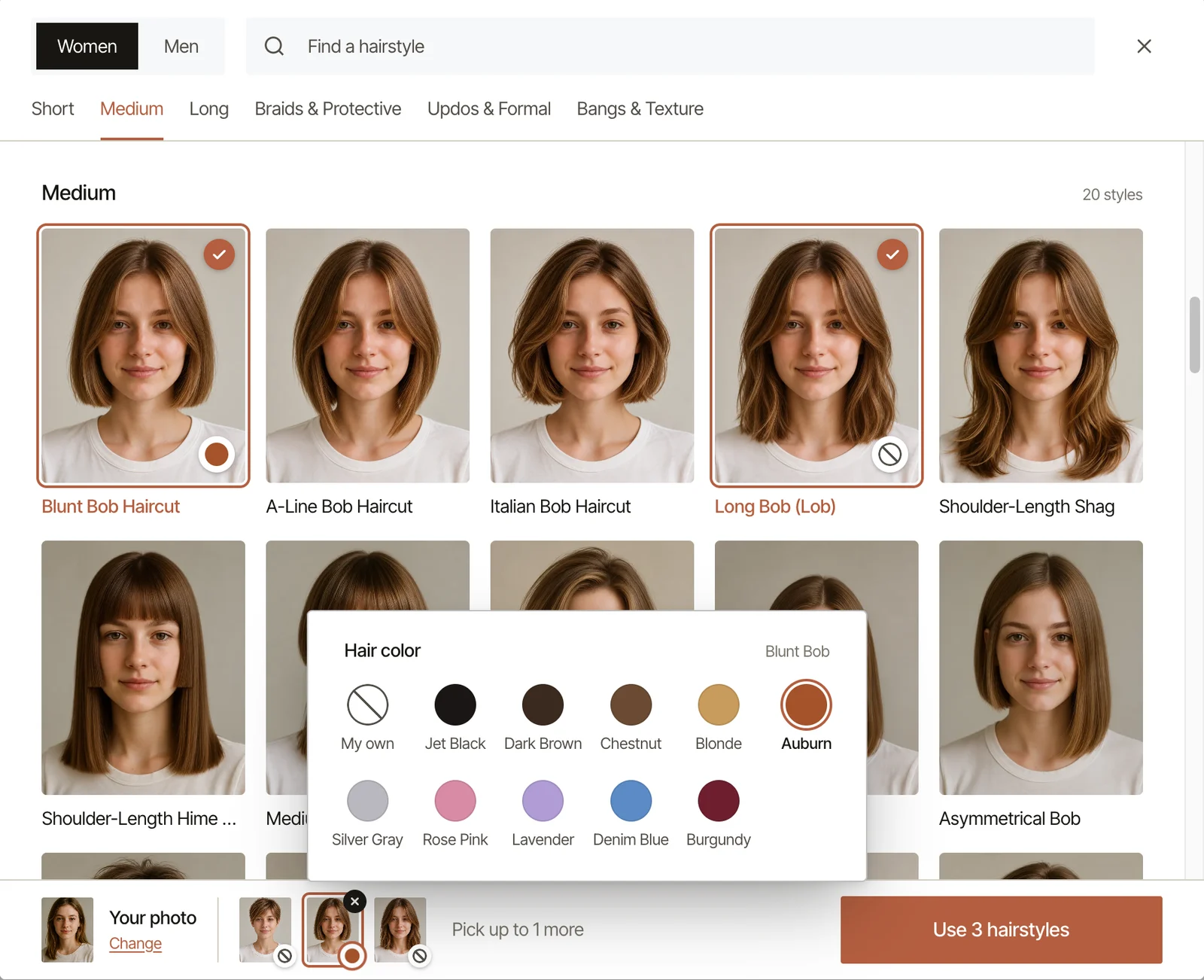
Select 02 · Hairstyles (“Choose hairstyles”) to open the style library. Pick Women or Men at the top; switching between them clears what you have picked. Browse by category—Short, Medium, Long, Braids & Protective, Updos & Formal, and Bangs & Texture—or type a name into Find a hairstyle.
Tap a style to select it, up to 4 at a time. Some styles include Front, Side, and Back reference views and a Style guide, which help you see the shape beyond a single front view.
Each selected hairstyle can have its own hair color. The default keeps your own color (“My own” in the color list), and that is the best starting point when you are judging the cut. When your picks are ready, press Use 3 hairstyles (the number matches your selection) to return to the main page, where they appear as small thumbnails on the second card. You can change a color, remove a style, or select Edit to reopen the library.
3. Press Generate
The main button reads Generate 3 looks, matching the number of hairstyles you chose. If something is missing, the tool tells you what to add first: your photo or at least one hairstyle.
Your first look is free and needs no sign-up: choose one hairstyle and press Generate. For a second look, or to generate several at once, sign in with Google. New accounts start with free credits (the no-sign-up look counts toward them), and each look costs 1 credit; once you are signed in, the button shows the total cost before you start. If your balance covers only some of the looks, those generate first and the rest wait as locked cards you can open with Unlock · 1 credit.
4. Review your looks
Generated looks go to a board titled Your hairstyles., grouped by photo. Cards fill in as each look finishes, and generating continues if you leave the page. Looks are saved to your account, so they are still there on another device until you delete them.
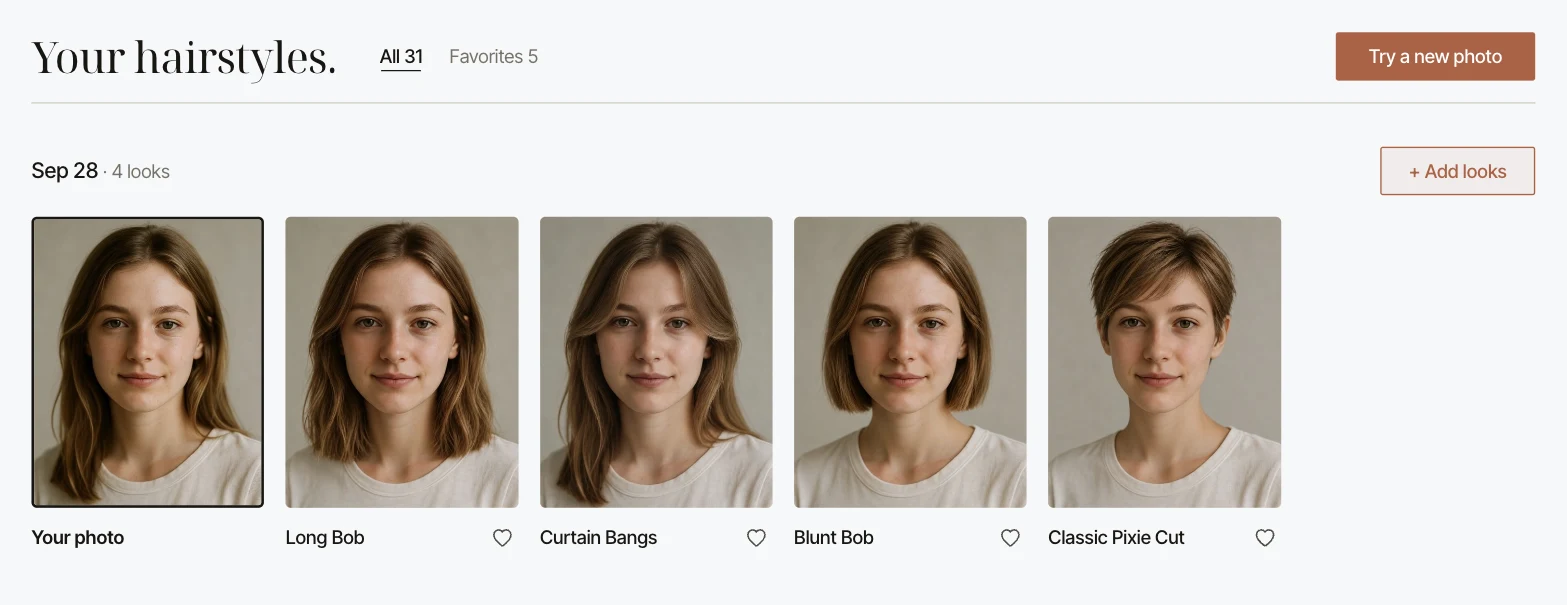
Open any look to view it larger. Switch between Before / after, Result only, and Compare, which gives you a slider over your original photo. From there you can add it to favorites, try Same cut, new color, or keep a copy with Download on a computer or Save on a phone.
To keep going, use + Add looks for more hairstyles on the same photo or Try a new photo to start from a different one. Select lets you pick several looks at once to download together on a computer or delete.
How do you compare hairstyle previews fairly?
Change one thing at a time. Keep the same photo and your own hair color, and let the 4 hairstyles in a batch differ in a single feature, such as three lengths or two fringe shapes. That way you can explain why you prefer one result.
Decide what you are testing before you pick:
- Length: where the ends fall—collarbone, chin, ears, or closer to the head.
- Fringe: how much forehead is covered and whether the center stays open.
- Texture: waves, defined curls, or a change in volume.
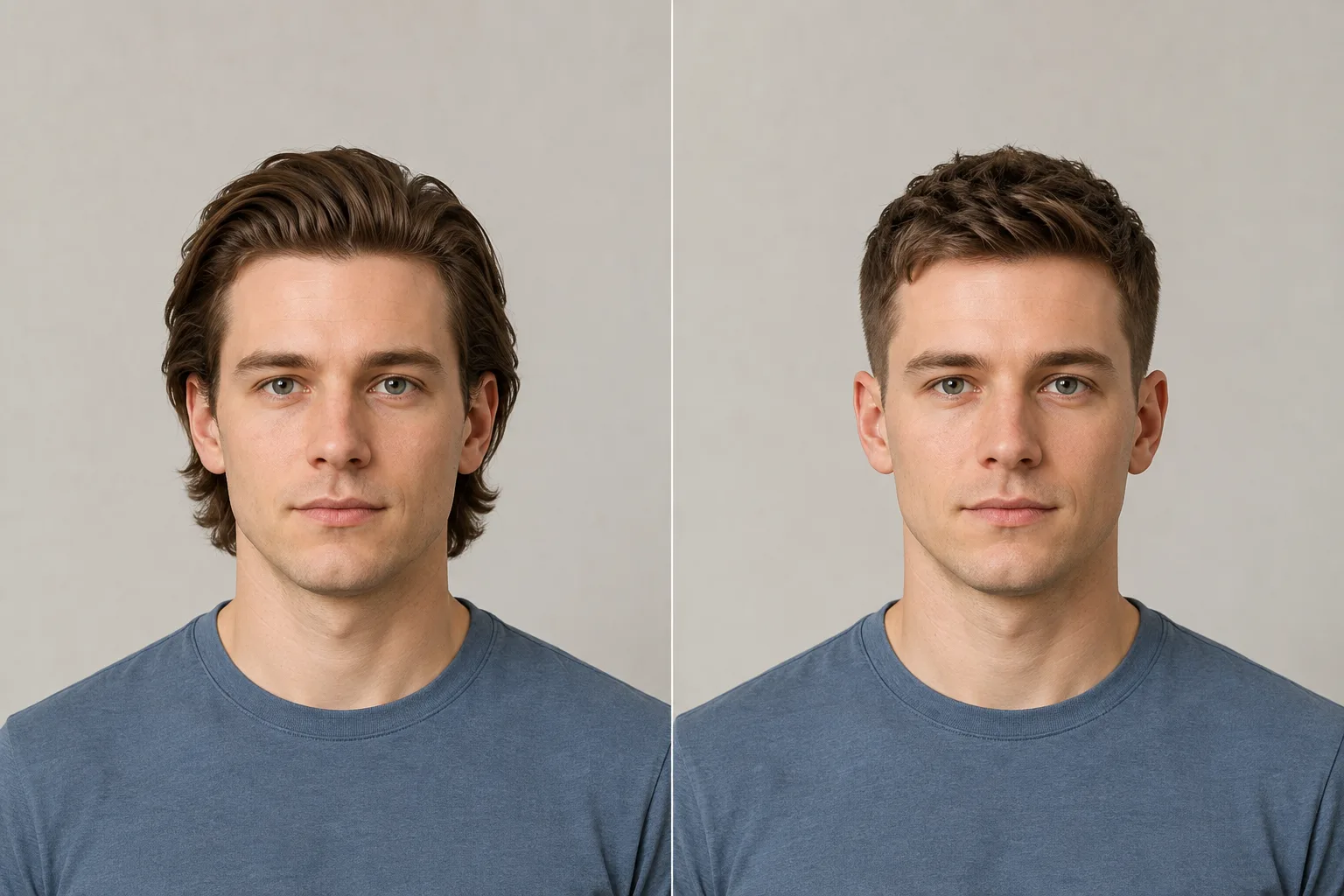
Then read each result in this order:
- Likeness: does your face still look like you in the original photo?
- Outline: where does the hair begin, widen, and end?
- The feature you chose: length, fringe opening, curl shape, or another detail you meant to test.
- Side effects: did lighting, skin, expression, or hair color also change?
Once you have a favorite cut, explore color with Same cut, new color, so the cut and the color are judged separately. Write one sentence per useful image, like “I like the chin length but want less width.” A look earns a place on your shortlist when you can name what you want to keep.
What does a strange preview usually mean?
It usually means the source photo is getting in the way, or the comparison changed too much at once. Use this table to decide what to try next.
| What you see | What may be getting in the way | A useful next attempt |
|---|---|---|
| “Can’t use this photo” | The image doesn’t read as a clear, front-facing portrait, or the file is the wrong type or too large | Use a well-lit JPG, PNG, or WebP under 10 MB that shows your whole face and hairline |
| Your eyes, jaw, or expression look different | Hair covered part of the face, the photo was soft, or the generation changed more than the hair | Set that look aside and try a sharper photo with the face clearly visible |
| The top or sides look cut off | The photo was framed too tightly | Choose a photo with space above and beside the full hair outline |
| Hair edges merge into the background | Hair and background are similar in tone, or uneven light hides the edge | Try an evenly lit photo with clearer separation around the head |
| A card says “Didn’t finish” | That look couldn’t be generated; your other cards aren’t affected | The credit is refunded; choose Retry · 1 credit or Remove |
| A card says “Not generated” | Your photo didn’t work for that particular look | The credit is refunded; try another style on this photo, or this style on a different photo |
| Two looks differ in color or face details you didn’t choose | The comparison has too many uncontrolled differences | Keep the same photo and your own color, then compare only the cut |
A better photo can improve the comparison, but it doesn’t guarantee a particular result.
Can a hairstyle try-on tell you which cut suits your face?
No. The tool doesn’t measure your face shape or recommend styles; you choose what to try, and it shows how that choice might look on your photo. It also can’t see your hair’s density, texture, cowlicks, or how it behaves after washing.
If you don’t know where to start, narrow the question first. Browse examples of short hair, bangs, curly hair, or a buzz cut, or work through a specific decision with the short-hair guide or the bangs guide.
What should you show your stylist?
Bring your original photo, one or two looks you like, and a short note for each. Say what to keep and what to change: “keep this length, soften the fringe” is more useful than asking for an exact copy of a generated image.
Add what the picture can’t show: how you usually dry and style your hair, whether you tie it back, and which parts of your routine you want to keep. Your stylist can then treat the image as a direction and judge how to get close to it with your hair.